
Only run brute-force and hashdump actions against systems you are authorized to test.
Nmap
nmap -p3306 <ip>
Banner grabbing
telnet <ip> 3306
nc -nv <ip> 3306
Nmap scripts
sudo nmap -p3306 --script=mysql-info <ip>
sudo nmap <ip> -p3306 -sVC --script mysql*
sudo nmap -p3306 -sVC -A <ip>
Users enumeration and brute force
# Check default credentials
mysql -h <ip> -u root -p

# Work around SSL certificate chain errors
mysql -h $ip -u user -ppassword --ssl-verify-server-cert=FALSE

# Brute force usernames and passwords
hydra -L users.txt -P pass.txt <ip> mysql
Database enumeration
Metasploit modules
use auxiliary/admin/mysql/mysql_sql
use auxiliary/scanner/mysql/mysql_schemadump
use auxiliary/scanner/mysql/mysql_hashdump
use auxiliary/admin/mysql/mysql_enum
use auxiliary/scanner/mysql/mysql_file_enum
SQL statements
show databases;
use <database>;
show tables;
select * from <table_name>;
select column1, column2, column3 from <table_name>;
Steps
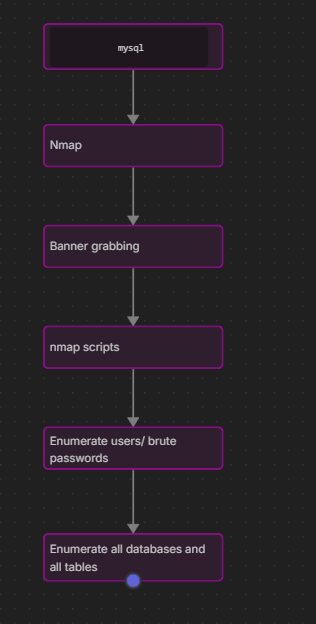
Dangerous Settings
| Setting | Description |
|---|---|
user | Sets which user the MySQL service will run as. |
password | Sets the password for the MySQL user. |
admin_address | The IP address on which to listen for TCP/IP connections on the administrative network interface. |
debug | This variable indicates the current debugging settings. |
sql_warnings | This variable controls whether single-row INSERT statements produce an information string if warnings occur. |
secure_file_priv | This variable is used to limit the effect of data import and export operations. |
Commands
| Command | Description |
|---|---|
mysql -u <user> -p<password> -h <IP address> | Connect to the MySQL server. There should not be a space between the -p flag and the password. |
show databases; | Show all databases. |
use <database>; | Select one of the existing databases. |
show tables; | Show all available tables in the selected database. |
show columns from <table>; | Show all columns in the selected table. |
select * from <table>; | Show everything in the desired table. |
select * from <table> where <column> = "<string>"; | Search for the needed string in the desired table. |